
Product updates

Journeys
Feature
User Roles

Shared by Georg
•
You can now control who can submit external forms and when they close. Journeys uses company-level roles to control who can access settings, navigation areas, and administrative actions across your company account.
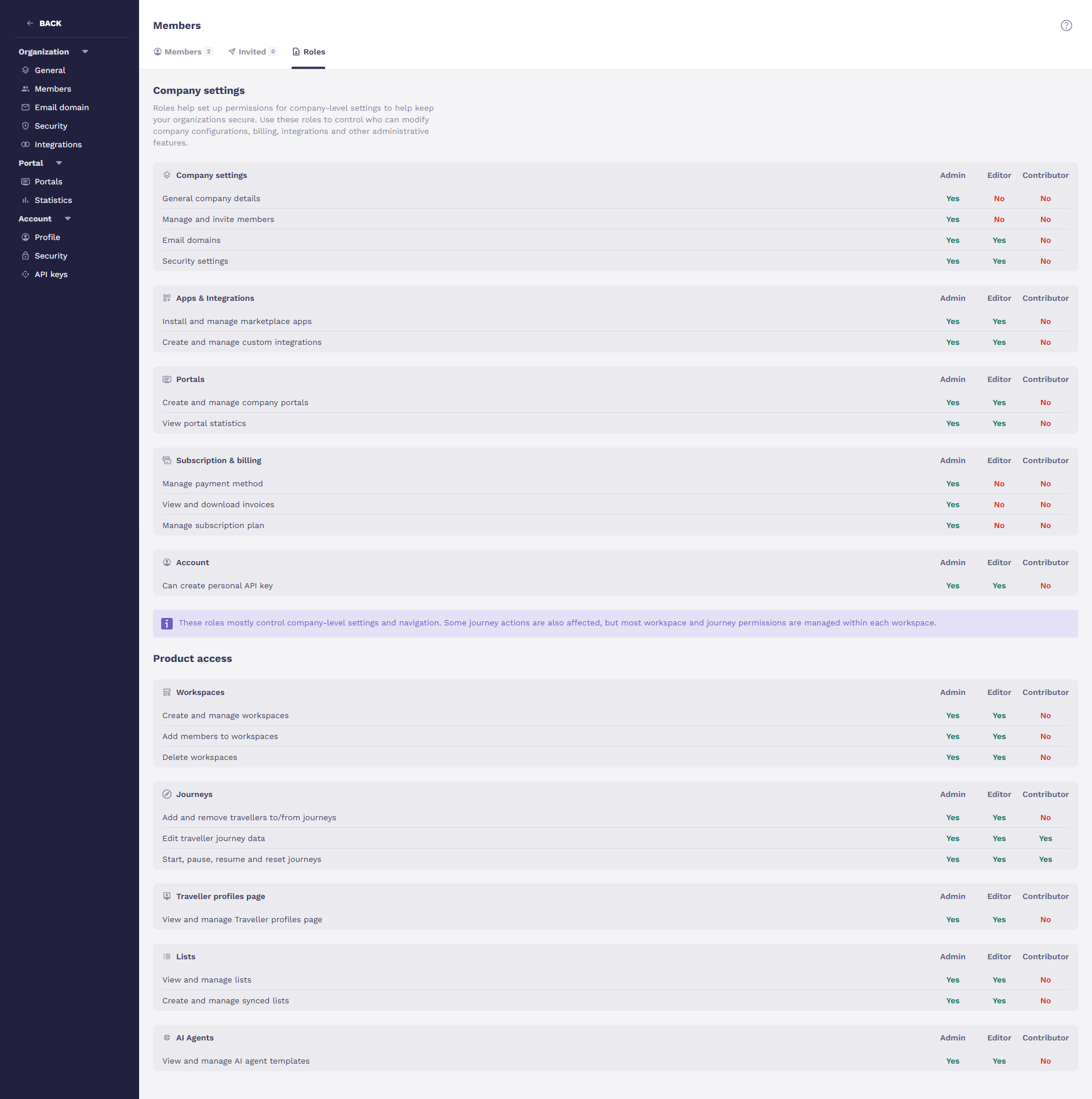
These roles ensure that users only see and interact with the parts of the platform they have permission to use.
There are three roles:
Admin -> Full access to everything, including billing, security settings, and member management
Editor -> Can build and manage journeys and workspaces, but can't touch sensitive company-level settings like billing or security
Contributor -> A focused role for people who need to work within journeys but don't need access to configuration or admin features
Roles are assigned when inviting a new member or by editing an existing one from the Members page.
Navigation automatically adjusts based on the role, contributors and editors simply won't see sections they don't have access to.
There's also a safety guard built in: you can't demote the last Admin in your organization.